
Sublimation Equipment & Supplies
Design Software Options
If you’re new to design and sublimation, you may not know where to start when choosing a design software. From free resources, to professional programs, and everything in between, there’s a ton of design software out there for you to give your crafts that extra personal touch.
When picking a program that’s right for you, there are a few considerations to keep in mind. Think about cost – if crafting is your new side-hustle, it may be worth the investment in choosing a subscription-based, professional program. For hobbyists, you may want to consider using open-source (aka, free!) or low-cost, single-payment programs. When doing your research, you’ll want to review a few YouTube tutorials on the basics of the program, and maybe even follow along after downloading a free trial of the program to see if it’s a good fit for you. To get you started, we found a range of programs to get you started on the right path.
Here Are Our Top Choices:

Paint.NET
Free or Low-cost One-time Payment
Paint.NET is available for free download on its site, or for a small, one-time payment in the Microsoft App Store. The “paid” version will come with automatic updates to the software, while with the free download you may have to keep an eye out for the newest version to download.
“Paint.NET® is image and photo editing software for PCs that run Windows. It features an intuitive and innovative user interface with support for layers, unlimited undo, special effects, and a wide variety of useful and powerful tools. An active online community provides friendly help, tutorials, and plugins.
…Originally intended as a free replacement for the Microsoft Paint software that comes with Windows, it has grown into a powerful yet simple image and photo editor tool. It has been compared to other digital photo editing software packages such as Adobe® Photoshop®, Corel® Paint Shop Pro®, Microsoft Photo Editor, and The GIMP.” – description on the Microsoft App Store.

CorelDRAW
Cost varies, one-time payment and subscription plans available
CorelDRAW is a professional graphics suite, capable of photo editing, graphic design, and illustration. They offer both one-time payment options with the option for upgrades, or a subscription model depending on the number of programs you wish to download.
“CorelDRAW® Graphics Suite is your fully loaded professional design toolkit for delivering breathtaking vector illustration, layout, photo editing, and typography projects with total efficiency. A budget-friendly subscription provides incredible ongoing value with instant, guaranteed access to exclusive new features and content, peak performance, and support for the latest technologies.”
GIMP
Open Source (Free)
With GIMP, you can retouch photos, composite images together, and create graphics and icons. GIMP offers comprehensive tutorials on their site, ranging from beginner level to advanced techniques. Since GIMP is an open-source program, it is available to download for free.
“GIMP is a cross-platform image editor available for GNU/Linux, macOS, Windows and more operating systems…Whether you are a graphic designer, photographer, illustrator, or scientist, GIMP provides you with sophisticated tools to get your job done. You can further enhance your productivity with GIMP thanks to many customization options and 3rd party plugins.” – GIMP website
Adobe Creative Cloud
Cost varies based on subscription plan
Adobe Creative Cloud offers a broad range of programs, specializing in photo editing, design, illustration, and more. Adobe Photoshop is best for editing photos and basic graphic design, while Adobe Illustrator is best for drawing, graphic design, or typography. Photoshop allows you to create vibrant images, remove unwanted blemishes or objects, create collages, add text and shapes, and so on. Illustrator is best for creating vector graphics, or graphics that can be resized without losing any quality. The Adobe Suite is popular among professionals due to its wide array of capabilities. While they don’t have any one-time payment options, they do have a variety of subscription options based on the specific program and number of programs you need; they also offer discounts to teachers and students. Adobe offers 20+ apps, “plus 20,000 fonts, storage, templates, and tutorials,” according to their website.
Sublimation Supplies
The sublimation magic all starts with a few essential items.
Ready to start your sublimation journey? You will need a few things like a heat press, sublimation printer, and software. Below is a list of everything you will need to get started with sublimation.
1. Heat Press
A heat press is an essential item to your sublimation success. Click below to understand what heat press is right for you.
2. Sublimation Printer
Another item you will need is a sublimation printer filled with sublimation inks and sublimation transfer paper. Below are a few options recommended by our industry partners.
- Sawgrass SG500
A4 desktop inkjet printer using 4 color Sawgrass SubliJet-HD inks - Sawgrass SG1000
A4 / A3 desktop inkjet printer using 4 color Sawgrass SubliJet-HD inks - Epson SureColor F100/F130/F170
A4 desktop inkjet printer using 4 color Epson UltraChrome DS inks - Epson SureColor F500/F560/F570
A4 / A3 / 24inch (60cm) desktop inkjet printer using 4 color Epson UltraChrome DS inks - Sawgrass Virtuoso 628
25 inch (63cm) desktop inktjet printer with 4 or 8-color SubliJet-HD ink configuration
3. Sublimation Compatible Product
If you are looking for amazing, high-quality sublimation blanks you came to the right place. Unisub has more than 320 products all manufactured specifically for dye sublimation.
4. Other Items
Besides the items noted above, there are a few other items you made already have laying around your house that will help make your sublimation journey a successful one.
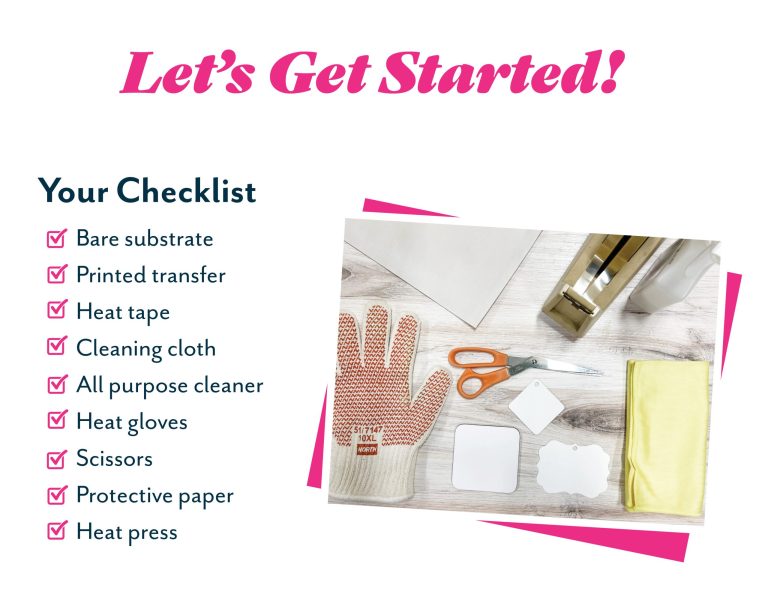
- Heat Tape
Heat tape will be used to secure the transfer from your sublimation printer to your product. Heat tape can be purchased at your local craft store. - Scissors
Scissors are needed to cut any excess white paper from around your printed transfer. - Clean Microfiber Cloth or Compressed Air
You will want to make sure that the surface of your product and transfer is clean and free of any dust or lint. - Heat Resistant Gloves
The products you are pressing will be hot coming off of the press. You will need heat resistant gloves or an oven mitt to avoid getting burned by your press. - Cooling Rack
You will want a cooling rack so your product can cool off for a bit after sublimation. - Protective Paper or Blowout Paper
Protective paper will absorb any excess inks from your transfer, keeping your heat press in great condition.
Grow Your Business with Unisub
Unisub offers a range of dye sublimation products that capture personal moments, inspire happiness and make a positive difference in people’s lives. And by offering these experiences to your customers, you can increase market share and improve your overall brand affinity. To learn more, contact one of our distributors in your area today.